


Avatar and Pictures


Thread Starter
Joined: Jul 2006
Posts: 148
From:
 Avatar and Pictures
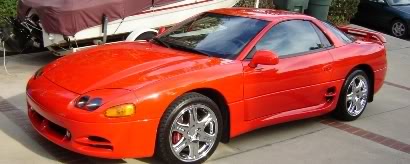
Can sombody tell me (exactly) how to post my pictures of my car on this forum? I have tried many different things. Even after resizing my picture to about 28 KB, it still says my file to too big. I also tried to link through photobucket and I can't see anything on any of my posts.
[IMG]local://upfiles/8701/C772255DFE5C488EAB2E788657D2331E.jpg[/IMG]
[IMG]local://upfiles/8701/C772255DFE5C488EAB2E788657D2331E.jpg[/IMG]

Senior Member
Joined: Feb 2007
Posts: 3,348
From: when a man and women fall in love, the man........
RE: Avatar and Pictures
i see a red 3000gt on oth links it seems like you got...what i do is i go to google, serch image upload, click on the first link, then upload watever pic i want, then on the forum hit insert pic put the "direct link to image" where it says to put it....or go to basic pictures and avatar how tos on this site

Super Moderator
Joined: Jan 2006
Posts: 11,758
From:
RE: Avatar and Pictures
Look at the how to's on the top
https://mitsubishiforum.com/forumid_5/tt.htm
https://mitsubishiforum.com/forumid_5/tt.htm
Super Moderator
Joined: Jan 2006
Posts: 11,758
From:
RE: Avatar and Pictures
ok gary i setup a picture file for you if you want that picture to actually show up in your signature instead of being just a link. Copy and paste this into the signature in your profile settings
[img] http://i42.photobucket.com/albums/e3...a/VR4Gary1.jpg [/img]
except just remove the spaces between the link and the img tags. And it should post it how my previous post looks
[img] http://i42.photobucket.com/albums/e3...a/VR4Gary1.jpg [/img]
except just remove the spaces between the link and the img tags. And it should post it how my previous post looks

Thread
Thread Starter
Forum
Replies
Last Post