


Complete newbie - help with converting Japanese to English


Junior Member
Joined: Jun 2014
Posts: 6
From: Christchurch, NZ

Well yesterday I downloaded the data for a disk from Mitsubishi web site and upgraded the Gracenote Data Base on my stereo
Everything went okay I don't know why but after the upgrade I now have my rear cam guide-lines back after losing them when converting from Japanese to English on my stereo
Could be just a coincidence but i'm not complaining
Everything went okay I don't know why but after the upgrade I now have my rear cam guide-lines back after losing them when converting from Japanese to English on my stereo
Could be just a coincidence but i'm not complaining

Senior Member
Joined: Jan 2014
Posts: 137
From: Alexandra, New Zealand
I still need to convert mine to English but I'm a little concerned at some of those conversions work while others do not. hate to lose what I have now as I'm finding my way around the screens.
Got the CD with all the new software and waiting to pull the trigger once my confidence level is up. Any work on getting the OZ/NZ maps?
jim
Got the CD with all the new software and waiting to pull the trigger once my confidence level is up. Any work on getting the OZ/NZ maps?
jim


Junior Member
Joined: Jan 2014
Posts: 27
Hi there,
We can convert your MMCS to english, please message us through our website - www.Giz-Tec.com
Are your reverse lines staying on now Malboo? I am looking into this issue and only seems to appear now and then - it possibly does have something to do with the Gracenote version.
We can convert your MMCS to english, please message us through our website - www.Giz-Tec.com
Are your reverse lines staying on now Malboo? I am looking into this issue and only seems to appear now and then - it possibly does have something to do with the Gracenote version.

Junior Member
Joined: Jul 2014
Posts: 13
From: New Zealand
 Reverse Lines
Giz-Tec | Phone and Tablet Repairs | Stereo Conversions try here 250 nz dollars works well
Now they disappear all time after setting in car type and in the camera setting have tried various settings
Reversed into a Mazda Demeio the other day but couldn't blame the reverse lines no damage to any car thank goodness LOL

Senior Member
Joined: Sep 2010
Posts: 1,390
From: Ottawa, ON
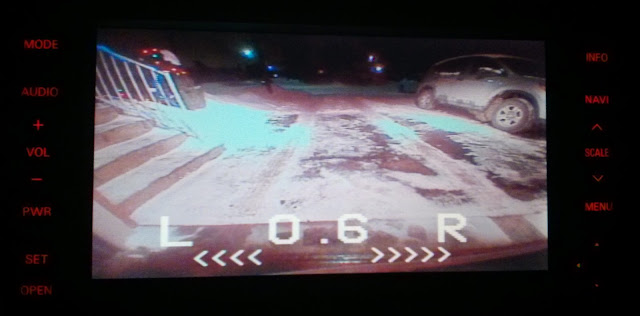
That's why I've installed an audible warning as well so if I even misjudge the distance by lines I still have beeping sound telling me I've gone to far as well as distance meter showing it.
Lines actually are removed completely for a cleaner picture.
Junior Member
Joined: Jan 2014
Posts: 27
Hi no my reverse lines were visable for 4 days or so
Now they disappear all time after setting in car type and in the camera setting have tried various settings
Reversed into a Mazda Demeio the other day but couldn't blame the reverse lines no damage to any car thank goodness LOL
Now they disappear all time after setting in car type and in the camera setting have tried various settings
Reversed into a Mazda Demeio the other day but couldn't blame the reverse lines no damage to any car thank goodness LOL

We will set it as default so you can choose to turn it off if you don't like them

Junior Member
Joined: Jun 2013
Posts: 28
From: Windhoek, Namibia, Southern Africa
To convert dial settings into english you may go to setting menue by pressing info button while parked. Once in setting menue, you may choose language option for you to get info on english. Other language options are available too

