


MMCS - How to - Aux in motion bypass


Thread Starter
|
Junior Member
Joined: Dec 2011
Posts: 4
 MMCS - How to - Aux in motion bypass
WARNING! Do this under your own discretion.
Our MMCS uses the VSS wire (white with blue stripes) and the navi antenna to disable the Aux, while its in motion. I constantly use my iPod for music, so why not use the screen for something useful like a constant rear view.
Parts Required:
- Mitsubishi Camera - MZ380462EX
- Camera harness - MZ607384EX
- Camera cover - MZ607432EX
*if you already have the MMCS but do not have the backup camera there is already a connector for you to use* photo can be found below. I purchased a 15$ universal camera on amazon and used the existing connector. It works great for the price!
- Mitsubishi Aux input PN#8750A145

- Double throw, double poll switch (DPDT switch)
- 20 gauge wire
- splices
- if you don't want splices you can solder them but make sure you protect them afterwords
- RCA cables to splice/solder on to
Tools Required:
- crimps
- screw driver
- solder iron + solder w/flux
- electrical tape
- tie wraps
Recommended Number of People
- 1 person to work, another person to fetch beer
Difficulty
- 5/10 - difficulty parts was fishing the wires through
Time to complete
- 4 hours
If you do not already have the camera installed, you'll first need to install your wires and rear view camera of course. The backup camera from mitsubishi will already come with instructions on how to route the wires. Once you've done that, up front behind your MMCS splice your backup video input into an RCA cable and to your aux. I made a little drawing. So you should have 1 wire coming from the back and splice it to 2 wires (one wire for your MMCS the other will be an RCA) don't worry about cutting off the connector and using it strictly for the camera.

*IMPORTANT - Remember when you cut off the connector leave about 3 inches so you can work with the wires*
Here is the connetor you need
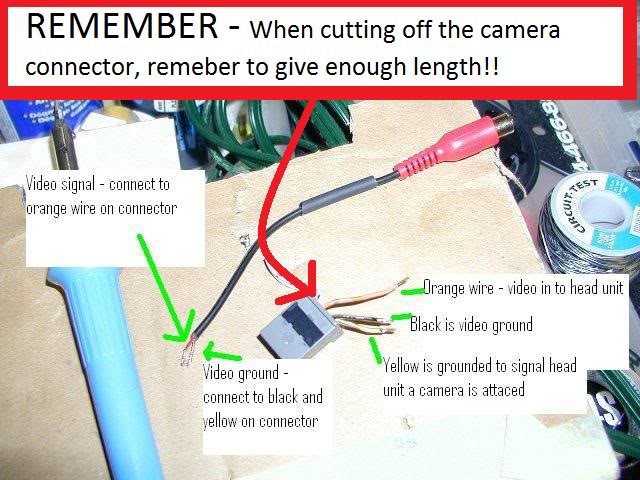
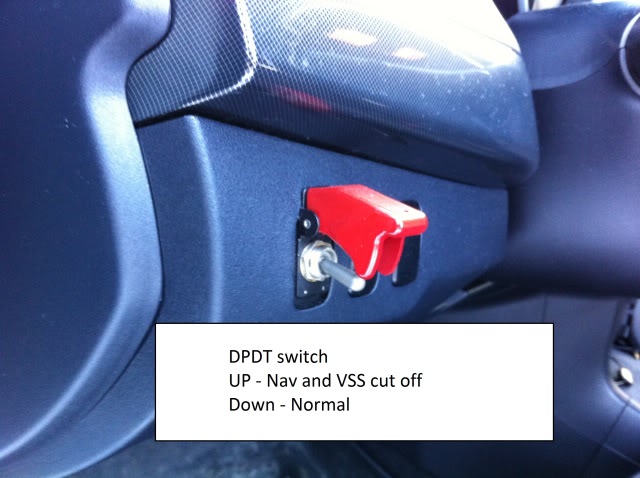
Once you have finished splicing your video cables you will be able to view your rear view camera when you REVERSE and in AUX (while stopped). But if you're in AUX and you start moving, the car will sense this and throw up that annoying "AUX IN MOTION". To disable this you need to unplug these wires permanently OR have a switch. The reason for the switch is for you to use the Navigation if you need it. The navi uses the VSS to quickly know you're moving and grab a GPS signal. But you'll have to remember switch it on or off.
find these wires here
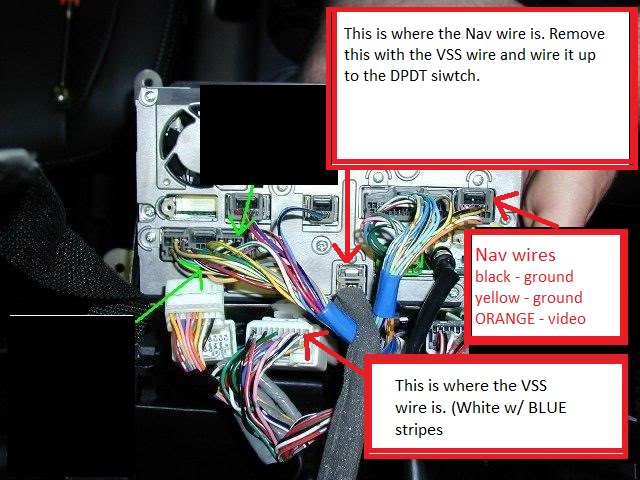
*IMPORTANT - Remember when you splice the wires leave about 3 inches from the connector so if you screw up, you have a bit to play with*
once you find them and splice them, get a DPDT switch - I also made another drawing

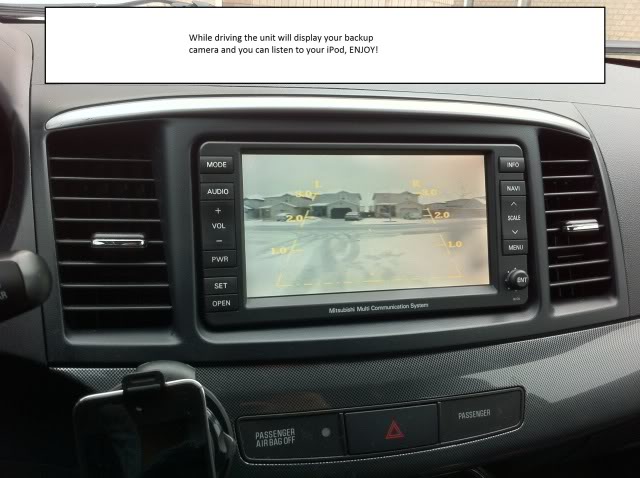
Here is the wire for backup video and my ipod for music
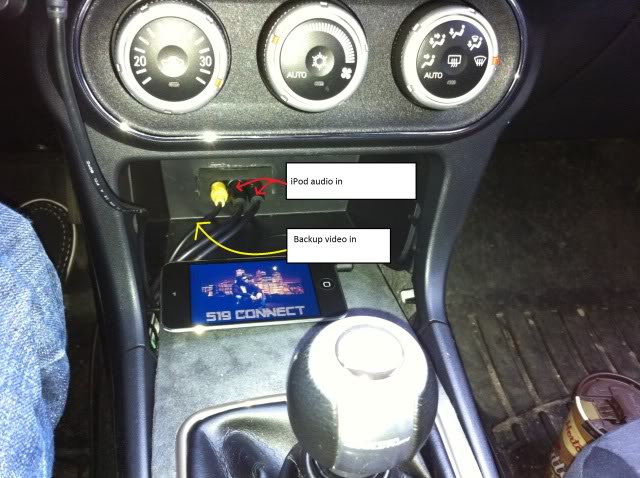
Our MMCS uses the VSS wire (white with blue stripes) and the navi antenna to disable the Aux, while its in motion. I constantly use my iPod for music, so why not use the screen for something useful like a constant rear view.
Parts Required:
- Mitsubishi Camera - MZ380462EX
- Camera harness - MZ607384EX
- Camera cover - MZ607432EX
*if you already have the MMCS but do not have the backup camera there is already a connector for you to use* photo can be found below. I purchased a 15$ universal camera on amazon and used the existing connector. It works great for the price!
- Mitsubishi Aux input PN#8750A145
- Double throw, double poll switch (DPDT switch)
- 20 gauge wire
- splices
- if you don't want splices you can solder them but make sure you protect them afterwords
- RCA cables to splice/solder on to
Tools Required:
- crimps
- screw driver
- solder iron + solder w/flux
- electrical tape
- tie wraps
Recommended Number of People
- 1 person to work, another person to fetch beer
Difficulty
- 5/10 - difficulty parts was fishing the wires through
Time to complete
- 4 hours
If you do not already have the camera installed, you'll first need to install your wires and rear view camera of course. The backup camera from mitsubishi will already come with instructions on how to route the wires. Once you've done that, up front behind your MMCS splice your backup video input into an RCA cable and to your aux. I made a little drawing. So you should have 1 wire coming from the back and splice it to 2 wires (one wire for your MMCS the other will be an RCA) don't worry about cutting off the connector and using it strictly for the camera.
*IMPORTANT - Remember when you cut off the connector leave about 3 inches so you can work with the wires*
Here is the connetor you need
Once you have finished splicing your video cables you will be able to view your rear view camera when you REVERSE and in AUX (while stopped). But if you're in AUX and you start moving, the car will sense this and throw up that annoying "AUX IN MOTION". To disable this you need to unplug these wires permanently OR have a switch. The reason for the switch is for you to use the Navigation if you need it. The navi uses the VSS to quickly know you're moving and grab a GPS signal. But you'll have to remember switch it on or off.
find these wires here
*IMPORTANT - Remember when you splice the wires leave about 3 inches from the connector so if you screw up, you have a bit to play with*
once you find them and splice them, get a DPDT switch - I also made another drawing
Here is the wire for backup video and my ipod for music
Last edited by Jayden905; Dec 29, 2011 at 06:34 PM.

Thread Starter
|
Junior Member
Joined: Dec 2011
Posts: 4
much appreciated  , no I'm no pro gear head, I'm just your average Joe just trying to get the best out of our machines.
, no I'm no pro gear head, I'm just your average Joe just trying to get the best out of our machines.


Senior Member
Joined: Aug 2010
Posts: 1,128
From: NJ/USA
Hey I wanted to know if anyone can help with getting my doors to lock after I turn the car on please do a dummies style  my model 2008 Mitsubishi Outlander XLS V6 4WD thx to all who help cant stress that enough!
my model 2008 Mitsubishi Outlander XLS V6 4WD thx to all who help cant stress that enough!
Thread Starter
|
Junior Member
Joined: Dec 2011
Posts: 4
 . Just hit lock when you get into the car....

Thread
Thread Starter
Forum
Replies
Last Post
Doublecheese
Mitsubishi Montero & Montero Sport
6
Jun 19, 2010 12:57 PM
