


No AUX option on MMCS Mode


Senior Member
Joined: Aug 2007
Posts: 947
From: México


Saludos. . .

Junior Member
Joined: Jul 2009
Posts: 3
From: France
Where to buy a VTR Harness
Thanks for these very helpful posts. I checked the link :
http://www.japanparts.com/db/partsli...UBISHI-002-001
and I noticed the famous VTR Harness doesn't seem to be available from there. Could you please tell me if there is another way to find it anywhere else ? (I unsucessfully googled with keywords VTR harness & D123)
THX
David-San
http://www.japanparts.com/db/partsli...UBISHI-002-001
and I noticed the famous VTR Harness doesn't seem to be available from there. Could you please tell me if there is another way to find it anywhere else ? (I unsucessfully googled with keywords VTR harness & D123)
THX
David-San
Junior Member
Joined: Jul 2009
Posts: 3
From: France
VTR Harness available from japanparts.com
Goog suggestion , I sent them a mail and it is available again at URL:
http://www.japanparts.com/db/partsli...UBISHI-002-001
They also have a AUX audio/video socket available at URL :
http://www.japanparts.com/db/partsli...ubishi-Adapter
They seem to be very professionnal!
THX
David-San
, I sent them a mail and it is available again at URL:http://www.japanparts.com/db/partsli...UBISHI-002-001
They also have a AUX audio/video socket available at URL :
http://www.japanparts.com/db/partsli...ubishi-Adapter
They seem to be very professionnal!
THX
David-San

Senior Member
Joined: Nov 2007
Posts: 108
From: Aylmer, Quebec, Canada
Help AUX for iPod in 08 XLS with MMCS (navi) and RES
Hi,
I dont know if anyone is still following this thread. I have read all the threads on this topic and I am not sure if I have found a case with my particular setup and results I would like to achieve.
I have an 08 XLS with MMCS( navi ) and RES. I want to be able to use my AUX inputs for my iPod when the DVD RES is in use. Currently, if the children are watching a DVD in the back, I cannot use the armrest RCA AUX input as the the RES overrides the sound.
Does someone know how to do either of the following:
1) Force or switch the AUX inputs in armrest to flow through MMCS? The kids watch the DVDs with wireless headsets in the back so I don't need the sound from the DVD RES. In other words I could disconnect the audio overide from RES and use the audio Left and Right only for my iPod.
Or
2) ( my preference ) is there another AUX or perhaps the CD button ( grayed out ) that I can use. I know there is an iPod like dock on the back of MMCS that could be used with a KENWOOD iPod adapter but apparently it does not work with the Canadian XLS with MMCS and RES. I could even consider using the Sirius left and right in if possible. I no longer subscribe.
Your help is greatly appreciated!
I dont know if anyone is still following this thread. I have read all the threads on this topic and I am not sure if I have found a case with my particular setup and results I would like to achieve.
I have an 08 XLS with MMCS( navi ) and RES. I want to be able to use my AUX inputs for my iPod when the DVD RES is in use. Currently, if the children are watching a DVD in the back, I cannot use the armrest RCA AUX input as the the RES overrides the sound.
Does someone know how to do either of the following:
1) Force or switch the AUX inputs in armrest to flow through MMCS? The kids watch the DVDs with wireless headsets in the back so I don't need the sound from the DVD RES. In other words I could disconnect the audio overide from RES and use the audio Left and Right only for my iPod.
Or
2) ( my preference ) is there another AUX or perhaps the CD button ( grayed out ) that I can use. I know there is an iPod like dock on the back of MMCS that could be used with a KENWOOD iPod adapter but apparently it does not work with the Canadian XLS with MMCS and RES. I could even consider using the Sirius left and right in if possible. I no longer subscribe.
Your help is greatly appreciated!

Junior Member
Joined: Jan 2011
Posts: 1
Some help please! :-)
Just trying to install on my Peugeot 4007 (Outlander clone)
A heads up for right hand drive owners - the D-123 connector is under the PASSENGER seat, not the driver seat.
OK, so I've got access to the D-123 connector and grounded pins 10 - 17 and have got the "AUX" input enabled on the MMCS display. When I select AUX I get a blank screen on the MMCS - is this correct?
I've tested continuity between D-123 and C-117 and all is good - continuity exists between the correct pins.
However, after connecting a pair of phono sockets to the Audio L/R & audio ground pins I still get no audio through the MMCS with Aux selected.
What am I doing wrong here? is there something else that I'm missing?
I've also blown a couple of 15A fuses powering the MMCS whilst doing this. Not sure why.
Hope someone can help.
Regards,
mistuk
Just trying to install on my Peugeot 4007 (Outlander clone)
A heads up for right hand drive owners - the D-123 connector is under the PASSENGER seat, not the driver seat.
OK, so I've got access to the D-123 connector and grounded pins 10 - 17 and have got the "AUX" input enabled on the MMCS display. When I select AUX I get a blank screen on the MMCS - is this correct?
I've tested continuity between D-123 and C-117 and all is good - continuity exists between the correct pins.
However, after connecting a pair of phono sockets to the Audio L/R & audio ground pins I still get no audio through the MMCS with Aux selected.
What am I doing wrong here? is there something else that I'm missing?
I've also blown a couple of 15A fuses powering the MMCS whilst doing this. Not sure why.
Hope someone can help.
Regards,
mistuk

Member
Joined: Sep 2012
Posts: 47
From: London
Have Aux display but no socket
Hi people
I have a 09 uk outlander and trying to work out if i can connect an adapter to what i believe maybe a the Aux wires found in the bottom back of the arm rest. The MMCS shows Aux but just need to find the input to attached my 3.5mm jack cable if i find one.
Any help on this will be great,
I have a 09 uk outlander and trying to work out if i can connect an adapter to what i believe maybe a the Aux wires found in the bottom back of the arm rest. The MMCS shows Aux but just need to find the input to attached my 3.5mm jack cable if i find one.
Any help on this will be great,
Member
Joined: Sep 2012
Posts: 47
From: London
 Aux displayed but no socket found
I have sort of the same problem but i do have the Aux displayed on my screen i just cannot fine the socket anywhere. I have however come across the spare socket at the back of the arm rest like the photo Stef48 posted but i am just trying to find this adapter online and no joy. The japparts website that was in this thread says no item found,
So please if anyone can help me resolve my AUX issue i will be greatful
So please if anyone can help me resolve my AUX issue i will be greatful
Hi everbody,
I'm looking for a solution for a long time but no issue found still now.
I'm driving a 4007 Peugeot which is a cousin of the Outlander (just have a look on the New members section).
I have the MMCS of the Outlander (seems to be the same) with the Rockford sound system.
I would like to connect my iPhone or iPod to the MMCS using the AUX mode of the menu. Unfortunatly, no AUX option appears on the screen (but it seems normal because there is no RCA connector in the car).
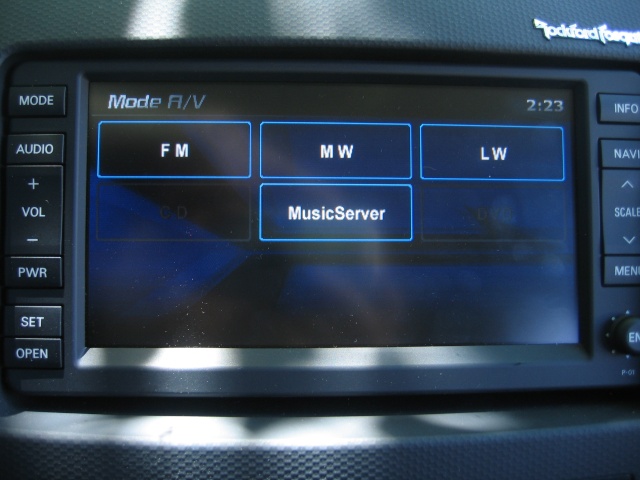
So I have read a lot of thread trying to find my solution. I have to say that I have learned a lot of things but I didn't succeed in resolving my problem.
Thanks to other threads, I found a spare connector on the back side of the central armrest. This connector is used on US or some Europe version for the RCA connector.
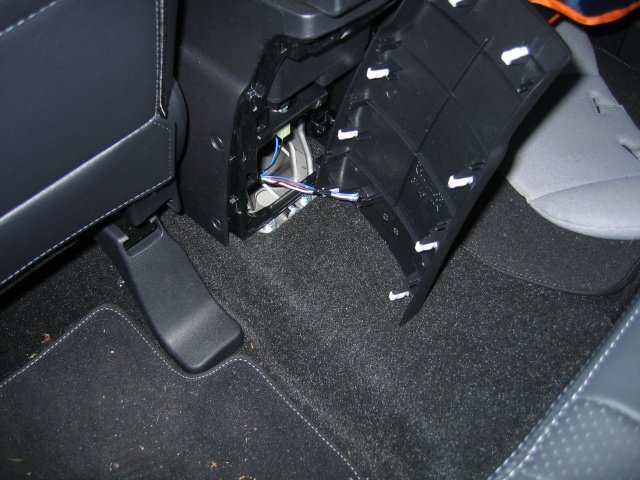
Some of Outlander owners just connect a jack or RCA connector to this spare part so they could connect there MP3 player (iPod or whatever). I have tried to connect an RCA connector following an other forum thread but AUX didn't appear on the screen.
So I decided to look back the MMCS to check if the 5 wires (3 for Audio the 2 others for the Video) from the armrest were connected to the MMCS.
 but it seems that none of these wires is connected to the MMCS back side (no "bip" heard while testing all the wires arriving to the MMCS).
So I wonder where these wires are going through the car ?
Is that a problem of software version ? (see my version following)
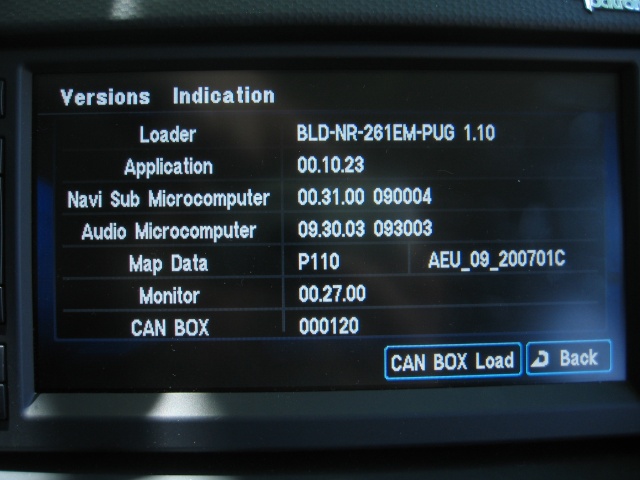
I check the existing connection and the result is this one:
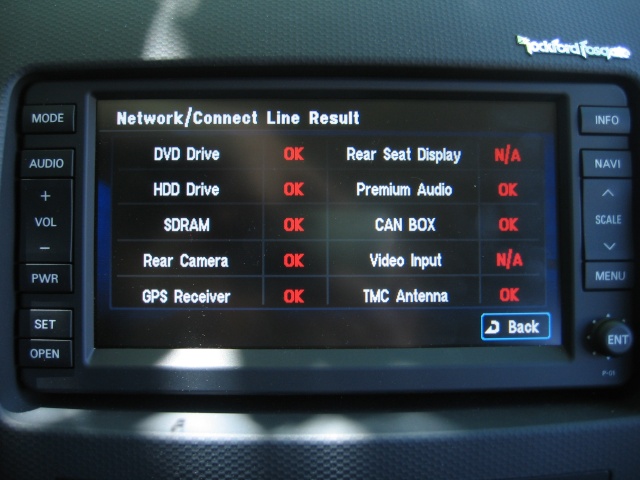
So I'm looking for some help to understand what's wrong.
(I have more pics of the back side of my MMCS if needed).
Thanks all for reading.
I'm looking for a solution for a long time but no issue found still now.
I'm driving a 4007 Peugeot which is a cousin of the Outlander (just have a look on the New members section).
I have the MMCS of the Outlander (seems to be the same) with the Rockford sound system.
I would like to connect my iPhone or iPod to the MMCS using the AUX mode of the menu. Unfortunatly, no AUX option appears on the screen (but it seems normal because there is no RCA connector in the car).
So I have read a lot of thread trying to find my solution. I have to say that I have learned a lot of things but I didn't succeed in resolving my problem.
Thanks to other threads, I found a spare connector on the back side of the central armrest. This connector is used on US or some Europe version for the RCA connector.
Some of Outlander owners just connect a jack or RCA connector to this spare part so they could connect there MP3 player (iPod or whatever). I have tried to connect an RCA connector following an other forum thread but AUX didn't appear on the screen.
So I decided to look back the MMCS to check if the 5 wires (3 for Audio the 2 others for the Video) from the armrest were connected to the MMCS.
but it seems that none of these wires is connected to the MMCS back side (no "bip" heard while testing all the wires arriving to the MMCS).So I wonder where these wires are going through the car ?
Is that a problem of software version ? (see my version following)
I check the existing connection and the result is this one:
So I'm looking for some help to understand what's wrong.
(I have more pics of the back side of my MMCS if needed).
Thanks all for reading.

Senior Member
Joined: Nov 2009
Posts: 626
From: Vancouver, Canada
If you want the official parts, the number depends on colour/video jack:
Backplate:
8011A168YA - Console for Mitsubishi Outlander XTXHZ1 - Genuine parts
and the jacks:
8750A047 - I/panel & related parts for Mitsubishi Outlander XLHYZ1 - Auto parts
So, assuming a black interior and you want the video jack, it would be 8011A169XA (back panel) and 8750A047 (connectors).
You can also do audio only (not sure if you need extra wires for video), which would be 8011A168XA and 8718A002
Backplate:
8011A168YA - Console for Mitsubishi Outlander XTXHZ1 - Genuine parts
and the jacks:
8750A047 - I/panel & related parts for Mitsubishi Outlander XLHYZ1 - Auto parts
So, assuming a black interior and you want the video jack, it would be 8011A169XA (back panel) and 8750A047 (connectors).
You can also do audio only (not sure if you need extra wires for video), which would be 8011A168XA and 8718A002