


ETACS options customization


Senior Member
Joined: Aug 2007
Posts: 947
From: México

My connection routine is as follow.
1 - Connect the device to PC
2 - Start PC
3 - Once running make sure the green light is on on the device
4 - Add the OBD cable to the device Press hard on the plug to make good contact
5 - Connect OBD to Mitsu connector
6 - Turn the key to run but don't start
7 - Start the software
By the way I suppose you managed to Activate the software
1 - Connect the device to PC
2 - Start PC
3 - Once running make sure the green light is on on the device
4 - Add the OBD cable to the device Press hard on the plug to make good contact
5 - Connect OBD to Mitsu connector
6 - Turn the key to run but don't start
7 - Start the software
By the way I suppose you managed to Activate the software


Senior Member
Joined: Aug 2010
Posts: 481
From: Montreal area, Quebec, Canada
At this point, If I was in your position, I would remove All traces of the software.
Shut down the laptop.
Go to bed.
Latter (sleep seems to help)
Re-install the LEXIA software (Remember no AV). with the device attached and recognized.
Connect to the car then Activate.
Shut down the laptop.
Go to bed.
Latter (sleep seems to help)
Re-install the LEXIA software (Remember no AV). with the device attached and recognized.
Connect to the car then Activate.

Senior Member
Joined: Nov 2009
Posts: 626
From: Vancouver, Canada
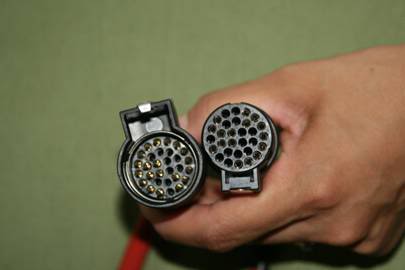
Did the two round cables connect properly and did the hook catch? Also, make sure the serial cable is firmly in place.
Do you see the green light on the device as being on? Does it flash 2-3 times shortly after you plug it in into your computer?
Do you see the green light on the device as being on? Does it flash 2-3 times shortly after you plug it in into your computer?

Junior Member
Joined: Jul 2011
Posts: 22
From: Daytona Beach, FL
2011 Outlander Sport
Well still no luck in being able to change anything in default parameters field 1/1 or 1/2. No matter what safe to change setting I try to change I get a programming fail message. 03114 must be correct because if I try another number I get a invalid code message.
Funny thing is if I go into the VIN setting I can actually change the VIN and f5 with 03114. When I do it shows sucess and I here 1 chime and the dash and radio reset. I exit the program and come back and sure enough the VIN has changed. Under the ifomation tab it shows the original VIN and currrent VIN, I can also do the actuator tests without a problem.
I am using a complete fresh install of XP-SP2 with no updates and I made an Acronis Image before loading Lexia. Perhaps I should re-image and re-install Lexia without the update?
I tried a few different models in the Lexia screen but I got a communication failure with each model I chose othe than c-crosser.
Any ideas or is this thing just not going to work with the outlander sport.
Funny thing is if I go into the VIN setting I can actually change the VIN and f5 with 03114. When I do it shows sucess and I here 1 chime and the dash and radio reset. I exit the program and come back and sure enough the VIN has changed. Under the ifomation tab it shows the original VIN and currrent VIN, I can also do the actuator tests without a problem.
I am using a complete fresh install of XP-SP2 with no updates and I made an Acronis Image before loading Lexia. Perhaps I should re-image and re-install Lexia without the update?
I tried a few different models in the Lexia screen but I got a communication failure with each model I chose othe than c-crosser.
Any ideas or is this thing just not going to work with the outlander sport.
Senior Member
Joined: Aug 2007
Posts: 947
From: México
Sure, the green light is on at all times and 3 times flashing light green in tool when connected to the computer
Junior Member
Joined: Jul 2011
Posts: 22
From: Daytona Beach, FL
2011 Outlander Sport
Guess I should also mention that I was not connected to the car when I installed, ran the update or actvated the software. Everything seems to install and activate fine though. Is there a specific reason that the car needs to be connected during any of these steps? TIA