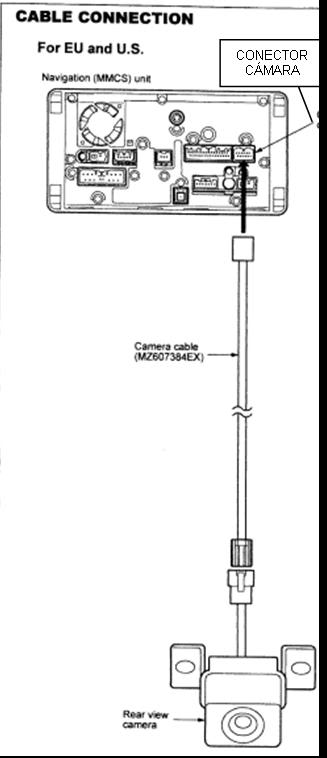
Detailed Rear Camera Installation


Junior Member
Joined: Nov 2007
Posts: 19

I received the cable that I order. I realized that the wire color code is completely different.
There are still 5 wires. They are still in the same pin locations tough. Here is the layout:
From older thread, the harness from the car: Yellow, Black, BLANK, Orange, White, Pink.
From the cable, the harness is now with wires at their respective locations: Blue, Gold, BLANK, White, Black, Red.
So I guess, the Blue and Gold are the new grounds. The White is the new Video In. From what the previous posts from rdenis, the other two wires (Old White and Old Pink) were not used. These two wires are now Black and Red, can it possibly mean that they are the power and ground for the camera?
The other thing I notice, from aad's post, the image of the OEM camera have only one harness that should hook right to the cable end of the harness, which suggest that the OEM camera gets power and ground through the MMCS. Correct? If that's the case, this may make the installation even easier.
Can anyone confirm?
There are still 5 wires. They are still in the same pin locations tough. Here is the layout:
From older thread, the harness from the car: Yellow, Black, BLANK, Orange, White, Pink.
From the cable, the harness is now with wires at their respective locations: Blue, Gold, BLANK, White, Black, Red.
So I guess, the Blue and Gold are the new grounds. The White is the new Video In. From what the previous posts from rdenis, the other two wires (Old White and Old Pink) were not used. These two wires are now Black and Red, can it possibly mean that they are the power and ground for the camera?
The other thing I notice, from aad's post, the image of the OEM camera have only one harness that should hook right to the cable end of the harness, which suggest that the OEM camera gets power and ground through the MMCS. Correct? If that's the case, this may make the installation even easier.
Can anyone confirm?
Last edited by 08Outtie; Mar 17, 2009 at 01:46 AM.
Junior Member
Joined: Nov 2007
Posts: 19
Finally got the camera installed.
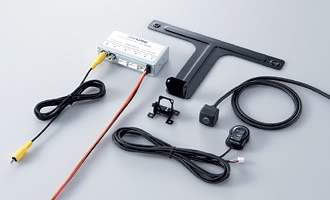
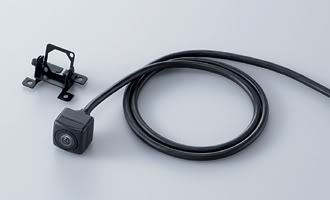
I went to the car audio shop and had them install for about $330, including labor and a license plate frame camera. It was kinda expensive, but it was about 2.5 hours of work, so I think it was fair. I chose the license plate frame camera over the cheaper "bullet" shape camera that could be found on ebay. The bullet style requires making a larger hole at the spoiler where as the license plate frame required only a tiny hole that is hidden behind the license plate itself. The other option was an even more expensive Pioneer camera which has a lot of additional functions. But the Pioneer camera is way over my budget.
I originally asked them to use the wire harness that I ordered, but they decided not to use it as they were following rdenis' instruction from this forum. I guess they'd rather run two skinny wires instead of a thicker cable that had 4 wires within it. Oh well, that wasted my money for the harness, but as long as they made the camera work, I am okay. (by the way, if someone is interested in getting the harness from me for less, PM me.)
During the install, they wanted to run the wire along the roof line, luckily I was there to stop them, so they ended up runing the wire along the bottom of the door frame. The installer kept telling me that it wouldn't interfere the airbag, but I insisted that I preferred the bottom door frame route. I was thinking to myself, I could have done the install myself if I do it along the roof. I don't pay you $330 to do a half *** job.
Anyway, now I'm a happy camper with the back up camera working.
PS: The installer did a test on the two un-used red and black wires within the harness I got. The red wire does have power when the car is in reverse, but only 6.5v, not 12v. So it can't power up the aftermarket camera. I guess the OEM camera uses 6.5v only!? Anyway, like I said, the installer followed rdenis' method and got power from the other wire connected to the MMCS.
I went to the car audio shop and had them install for about $330, including labor and a license plate frame camera. It was kinda expensive, but it was about 2.5 hours of work, so I think it was fair. I chose the license plate frame camera over the cheaper "bullet" shape camera that could be found on ebay. The bullet style requires making a larger hole at the spoiler where as the license plate frame required only a tiny hole that is hidden behind the license plate itself. The other option was an even more expensive Pioneer camera which has a lot of additional functions. But the Pioneer camera is way over my budget.
I originally asked them to use the wire harness that I ordered, but they decided not to use it as they were following rdenis' instruction from this forum. I guess they'd rather run two skinny wires instead of a thicker cable that had 4 wires within it. Oh well, that wasted my money for the harness, but as long as they made the camera work, I am okay. (by the way, if someone is interested in getting the harness from me for less, PM me.)
During the install, they wanted to run the wire along the roof line, luckily I was there to stop them, so they ended up runing the wire along the bottom of the door frame. The installer kept telling me that it wouldn't interfere the airbag, but I insisted that I preferred the bottom door frame route. I was thinking to myself, I could have done the install myself if I do it along the roof. I don't pay you $330 to do a half *** job.
Anyway, now I'm a happy camper with the back up camera working.
PS: The installer did a test on the two un-used red and black wires within the harness I got. The red wire does have power when the car is in reverse, but only 6.5v, not 12v. So it can't power up the aftermarket camera. I guess the OEM camera uses 6.5v only!? Anyway, like I said, the installer followed rdenis' method and got power from the other wire connected to the MMCS.
Last edited by 08Outtie; Mar 21, 2009 at 07:27 PM.

Junior Member
Joined: Aug 2007
Posts: 7
Hi there,
Does somebody know what happened to the 3rd part of this guide (see page 1).
It seems that it's not complete and I need the wiring scheme between the output of my Pioneer ND-BC1 (CINCH connector) and the MMCS.
I printed that guide a very long ago and I remember that it was 100% complete.
But I can't find my print anymore.
I've that camera since about 2 years and it's only now that I've found time to install it (it's a shame, I know).
Does somebody know what happened to the 3rd part of this guide (see page 1).
It seems that it's not complete and I need the wiring scheme between the output of my Pioneer ND-BC1 (CINCH connector) and the MMCS.
I printed that guide a very long ago and I remember that it was 100% complete.
But I can't find my print anymore.
I've that camera since about 2 years and it's only now that I've found time to install it (it's a shame, I know).

Member
Joined: Apr 2009
Posts: 46
I have one simple question: if i order the rear camera kit and the wire from this link:
http://www.trademotion.com/partlocat...766&startrow=1
Is it plug and play, install the cam and run the wire trought tme mmcs and plug it and everything will work? My car is a 08 XLS outlander w/navi
http://www.trademotion.com/partlocat...766&startrow=1
Is it plug and play, install the cam and run the wire trought tme mmcs and plug it and everything will work? My car is a 08 XLS outlander w/navi
Junior Member
Joined: Aug 2007
Posts: 7
Hi there,
Does somebody know what happened to the 3rd part of this guide (see page 1).
It seems that it's not complete and I need the wiring scheme between the output of my Pioneer ND-BC1 (CINCH connector) and the MMCS.
I printed that guide a very long ago and I remember that it was 100% complete.
But I can't find my print anymore.
I've that camera since about 2 years and it's only now that I've found time to install it (it's a shame, I know).
Does somebody know what happened to the 3rd part of this guide (see page 1).
It seems that it's not complete and I need the wiring scheme between the output of my Pioneer ND-BC1 (CINCH connector) and the MMCS.
I printed that guide a very long ago and I remember that it was 100% complete.
But I can't find my print anymore.
I've that camera since about 2 years and it's only now that I've found time to install it (it's a shame, I know).


Senior Member
Joined: Aug 2007
Posts: 947
From: México