


ETACS options customization


Junior Member
Joined: Nov 2012
Posts: 2
From: Philippines

Hello guys, been watching/backreading this thread for some time now.  (thanks to vadimus/claude who started this and other who contributed as well)
here's my 2011 ASX details (erased the VIN btw)
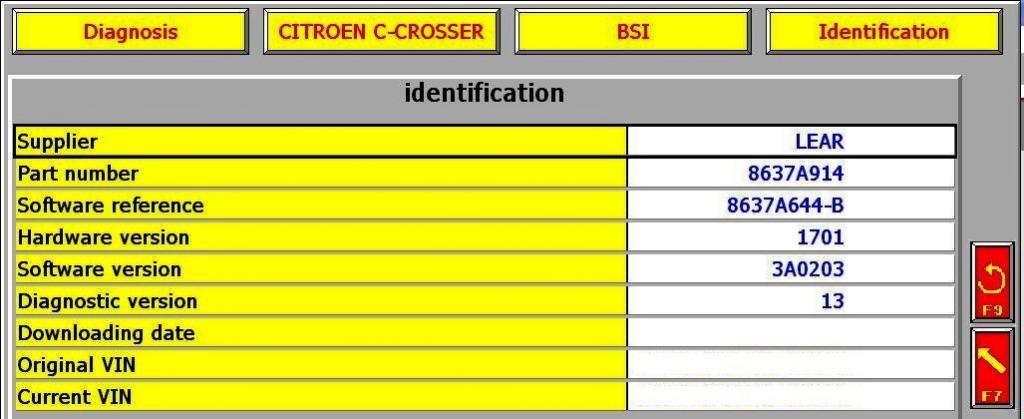
i'm lost somewhere about the diagbox with the latest updates - can i run it on win7 pro/64bit? Or should i stick to my old laptop running XP pro (revived for Lexia/PP use only
  ).
).
whats' your recommendations and best update to work with my ASX's version?
(thanks to vadimus/claude who started this and other who contributed as well)here's my 2011 ASX details (erased the VIN btw)
i'm lost somewhere about the diagbox
with the latest updates - can i run it on win7 pro/64bit? Or should i stick to my old laptop running XP pro (revived for Lexia/PP use only ).whats' your recommendations and best update to work with my ASX's version?

Thread Starter
|
Senior Member
Joined: Sep 2010
Posts: 1,390
From: Ottawa, ON

Only XP or 32 bit Vista/7.


Junior Member
Joined: Jun 2010
Posts: 24
From: 16 miles north of Boston, MA
Well TrailBrake, it appears I am at the crossroad you stumbled upon earlier where my DiagBox V06.26 asks you to enter the " Access Code supplied by technical assistance" when attempting to secect the "MISSING" parameter for the TPMS.
I guess I have to hunt down the TLCD Fix file as Vadimus directed.. I could only find one source on the internet for the file at mhhauto.com. but they want $10.00 in order to download the file. Would it be possible to email me the file you found if it is not too large? ...or link me to another site you know of where I can download it???
I am so close but getting a little frustrated. It appears that I am not very computer savvy as of late, so please bear with me. Thanks.
I guess I have to hunt down the TLCD Fix file as Vadimus directed.. I could only find one source on the internet for the file at mhhauto.com. but they want $10.00 in order to download the file. Would it be possible to email me the file you found if it is not too large? ...or link me to another site you know of where I can download it???
I am so close but getting a little frustrated. It appears that I am not very computer savvy as of late, so please bear with me. Thanks.
Last edited by allezzov; Nov 19, 2012 at 02:28 PM.


Junior Member
Joined: Jun 2010
Posts: 24
From: 16 miles north of Boston, MA
any Diagbox release notes???
After successfully disabling my TPMS yesterday I attempted this morning to change the setting for my fog lights to operate independently of the low beams. I started DiagBox V6.26 and received an error Message when the program was loading " ERROR 20 - License Code Fault".
I reloaded Diagbox to V6.19 not doing any internet updates and was able to change the fog light settings.
Does anyone know what the upgrade version Release Notes state about any enhancements/corrections to the various update sequences? I may stay at Version 6.19 and just continue onward.
I reloaded Diagbox to V6.19 not doing any internet updates and was able to change the fog light settings.
Does anyone know what the upgrade version Release Notes state about any enhancements/corrections to the various update sequences? I may stay at Version 6.19 and just continue onward.