


MMCS - Rear camera + iPod Video IN


Senior Member
Joined: Aug 2007
Posts: 947
From: México

Hi all,
Do you have any idea, is there any possibility to have rear camera connected to MMCS AND to have also another video source running (iPod)?
The rear camera should keep will working as usually, when running backward but, in rest, the iPod video should be available on MMCS' screen.
The service guys are not sure, saying that only one video connector is available on MMCS diagram.
Thanks ,
Costin
Do you have any idea, is there any possibility to have rear camera connected to MMCS AND to have also another video source running (iPod)?
The rear camera should keep will working as usually, when running backward but, in rest, the iPod video should be available on MMCS' screen.
The service guys are not sure, saying that only one video connector is available on MMCS diagram.
Thanks ,
Costin

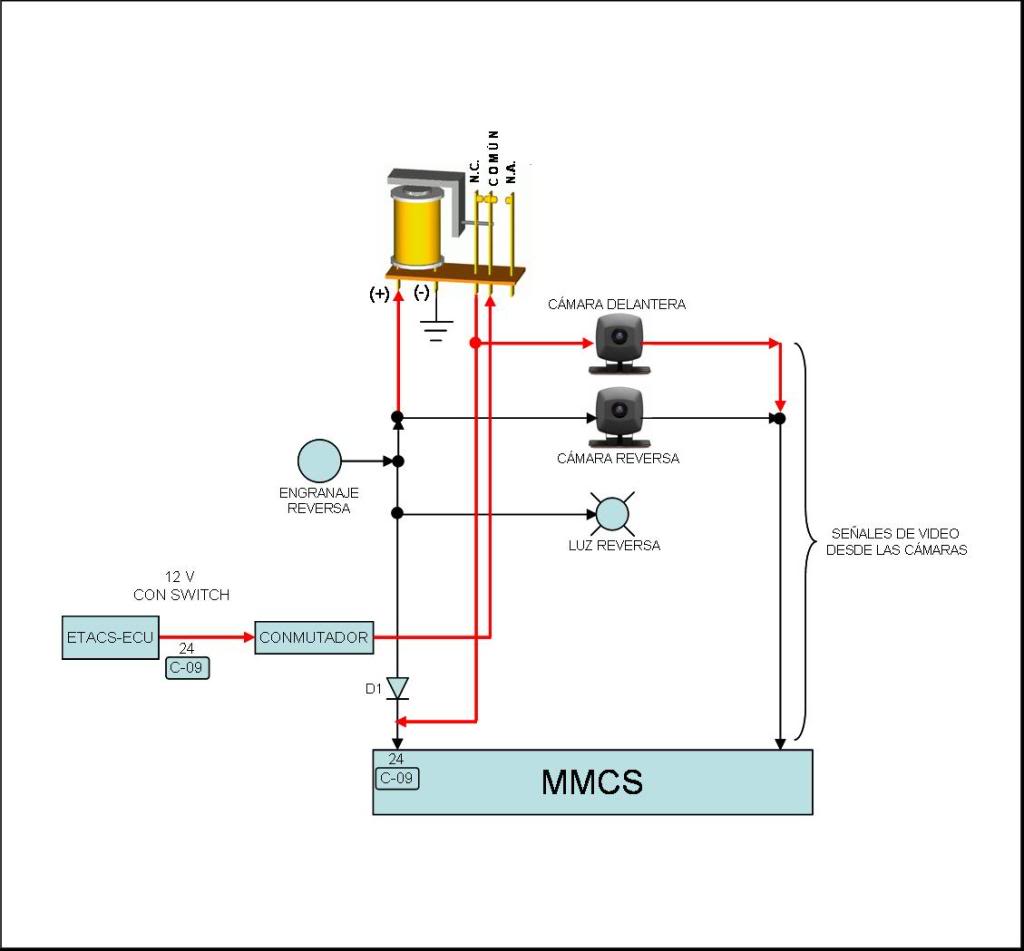
Red line is for my project
Black line is OEM wired
Explanation: When reverse is engraned, all operation in NORMAL, but when you want see iPod video, close the switch (CONMUTADOR) to simulate reverse MODE in MMCS and send the video signal from iPod to MMCS; diode D1 it avoids feedback to OEM reverse circuit, and at any moment you have available the rear camera. Is necessary one relay
Text in spanish, I try to modified it to english
Last edited by jsrd; May 21, 2009 at 07:34 AM.

Senior Member
Joined: Sep 2008
Posts: 104
From: Athens, Greece
Is this perhaps of any interest to you guys??
http://www.mitsubishi-motors.com/cor...006/18e_14.pdf
http://www.mitsubishi-motors.com/cor...006/18e_14.pdf
Last edited by dger; May 23, 2009 at 06:21 AM.


Thread Starter
|
Senior Member
Joined: Jul 2007
Posts: 143
From:
Video switcher
First of all, sorry for the late answer.
Second, as far as I noticed you are trying to run a camera and to simulate that's in reverse, to keep also the radio. A similar project developed also doublecheese with a FLIR camera (for nightvision).
I understood the the schematics and I remember that I drawn a similar one using an electronic switch (4 inputs and one output - for video channel) coupled with the 2 way manual switch - one way for the fake rear signal and one to command the electronic video switch above based mostly on the schematics from this address (http://www.glolab.com/freeinfo/images/videosw.pdf)
The real 'reverse' command would override the manual switch, no matter which position it would be.
Maybe doublecheese could still have that schematic and post it here.
I ran the cables for AUX video /audio in and I adopted that solution for now.
All the best
Second, as far as I noticed you are trying to run a camera and to simulate that's in reverse, to keep also the radio. A similar project developed also doublecheese with a FLIR camera (for nightvision).
I understood the the schematics and I remember that I drawn a similar one using an electronic switch (4 inputs and one output - for video channel) coupled with the 2 way manual switch - one way for the fake rear signal and one to command the electronic video switch above based mostly on the schematics from this address (http://www.glolab.com/freeinfo/images/videosw.pdf)
The real 'reverse' command would override the manual switch, no matter which position it would be.
Maybe doublecheese could still have that schematic and post it here.
I ran the cables for AUX video /audio in and I adopted that solution for now.
All the best

Member
Joined: May 2008
Posts: 86
First of all, sorry for the late answer.
Second, as far as I noticed you are trying to run a camera and to simulate that's in reverse, to keep also the radio. A similar project developed also doublecheese with a FLIR camera (for nightvision).
I understood the the schematics and I remember that I drawn a similar one using an electronic switch (4 inputs and one output - for video channel) coupled with the 2 way manual switch - one way for the fake rear signal and one to command the electronic video switch above based mostly on the schematics from this address (http://www.glolab.com/freeinfo/images/videosw.pdf)
The real 'reverse' command would override the manual switch, no matter which position it would be.
Maybe doublecheese could still have that schematic and post it here.
I ran the cables for AUX video /audio in and I adopted that solution for now.
All the best
Second, as far as I noticed you are trying to run a camera and to simulate that's in reverse, to keep also the radio. A similar project developed also doublecheese with a FLIR camera (for nightvision).
I understood the the schematics and I remember that I drawn a similar one using an electronic switch (4 inputs and one output - for video channel) coupled with the 2 way manual switch - one way for the fake rear signal and one to command the electronic video switch above based mostly on the schematics from this address (http://www.glolab.com/freeinfo/images/videosw.pdf)
The real 'reverse' command would override the manual switch, no matter which position it would be.
Maybe doublecheese could still have that schematic and post it here.
I ran the cables for AUX video /audio in and I adopted that solution for now.
All the best
Sorry for the very late reply
 Since my problem was solved about a year ago, I didn't visit tihs forum that often.
 PM me your e-mail address, I will send you tomorrow the diagrams RCOSTIN drew for me.
But I still think you're better off with this ready kit from Japan...
rgds

Junior Member
Joined: Jul 2012
Posts: 1
@rcostin
my navi is an european navi:
Connector C6
rearview camera
81 pink not used
82 white not used
83 orange video in
84 open not used
85 black ground video
86 yellow camera recognition
if you look from behind cable side
81-82-83-xx-85-86
xx_xx_xx_xx_xx_xx
xx = open not used
connector C8
aux-in
48 blue-green audio L
64 blue-white audio R
49 blue-red audio ground
47 skyblue video in
63 black-pink video ground
I hope I have understood you correctly and you have meant[/align][/align]greeting madmex[/align]
my navi is an european navi:
Connector C6
rearview camera
81 pink not used
82 white not used
83 orange video in
84 open not used
85 black ground video
86 yellow camera recognition
if you look from behind cable side
81-82-83-xx-85-86
xx_xx_xx_xx_xx_xx
xx = open not used
connector C8
aux-in
48 blue-green audio L
64 blue-white audio R
49 blue-red audio ground
47 skyblue video in
63 black-pink video ground
I hope I have understood you correctly and you have meant[/align][/align]greeting madmex[/align]
Thanks for the pin out!
I have some questions about the rear camera, pin 86 "camera recognition" what is that for?
and need the camra to be PAL or NTCS?
Thanks


Junior Member
Joined: Dec 2010
Posts: 1
Hello everyone!
Thank you for the information. I am working on the same project.
I want to install front camera in my Mitsubishi ASX.
I will try to post my idea and the schema.
Regards.

Thank you for the information. I am working on the same project.
I want to install front camera in my Mitsubishi ASX.
I will try to post my idea and the schema.
Regards.
Last edited by dgjboy; Aug 22, 2012 at 06:14 PM. Reason: Schematic


Thread
Thread Starter
Forum
Replies
Last Post
martin08
Mitsubishi Lancer and Lancer Sportback
2
Mar 31, 2014 12:47 AM
zontarh
Mitsubishi Outlander
9
May 7, 2007 07:28 PM
